

Download isoHunt – Free Torrent Search Engine, Secure & Fast
Introduction: Why isoHunt Still Matters in 2025
When it comes to locating BitTorrent files quickly, isoHunt remains one of the most recognizable names on the web. Launched over a decade ago, the platform has survived legal battles, design overhauls, and the rise of competing services like BTJunkie and The Pirate Bay. Its staying power stems from a simple promise: search, find, and download torrent files without paying for a subscription.
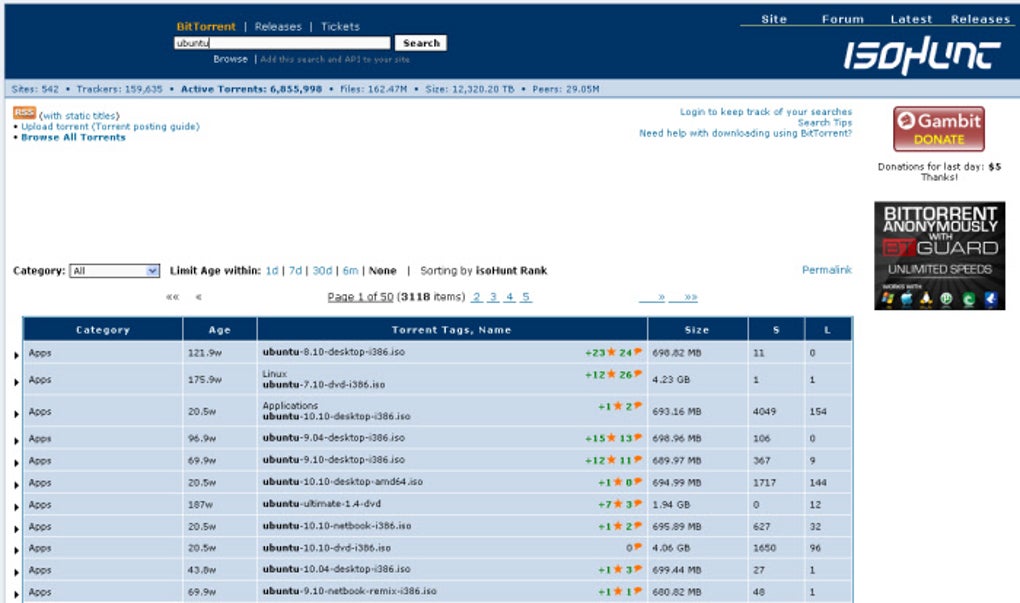
For users who value a straightforward, no‑frills interface, isoHunt offers a functional layout that puts the search bar front and center, allowing you to type a keyword and instantly receive categorized results. While the visual design may feel dated compared with modern, glossy apps, the underlying engine is fast, the categorization is thorough, and the “New Release” tab provides a handy way to browse the freshest torrents filtered by age. This review dives deep into isoHunt’s core capabilities, installation steps, platform compatibility, and the pros and cons that determine whether you should add it to your daily download toolkit.
Overview & Core Features
isoHunt is a web‑based torrent search engine that indexes millions of .torrent files across a broad range of categories such as movies, TV shows, games, software, music, and e‑books. The service does not host any files itself; instead, it provides direct links to peer‑to‑peer (P2P) sources, meaning you still need a separate BitTorrent client (e.g., uTorrent, Transmission, or qBittorrent) to complete the download. isoHunt’s strength lies in its powerful categorization system, which lets users narrow results by adding a category keyword before or after the search term. The platform also offers a “New Release” section that displays the latest torrents uploaded within the past few hours, and a built‑in age filter that helps you prioritize recent content.
Feature List
- Comprehensive indexing of millions of torrent files across 15+ categories.
- Category‑specific search modifiers (e.g., “movies: Inception”).
- “New Release” tab with age‑based filtering for the freshest uploads.
- Simple, functional UI that loads quickly even on low‑bandwidth connections.
- Direct links to magnet URLs and .torrent files for seamless client integration.
- Built‑in safety notice reminding users to verify file integrity and legality.
- Responsive design that works on desktop browsers and mobile browsers.
- No registration required – start searching instantly.
Installation & Usage Instructions
Because isoHunt is a web application, there is no software to install on your computer. The entire experience runs inside a standard web browser, making it compatible with virtually any operating system that supports modern HTML5 standards. Follow these steps to get the most out of isoHunt:
Step‑by‑Step Guide
- Open your preferred browser. isoHunt works well with Chrome, Firefox, Edge, Safari, and even lightweight browsers like Opera Mini.
- Navigate to the official site. Enter
https://isoHunt.to(or the current domain if the URL changes) in the address bar and press Enter. - Enter your search term. Use the central search bar to type the name of the file you’re looking for. For example, “Ubuntu ISO” or “Avengers Endgame 1080p”.
- Add a category (optional). Prefix or suffix your query with a category keyword to narrow results, e.g., “software: Photoshop” or “movies: Inception”.
- Review the results. isoHunt displays a list of torrents with details such as file size, seed/peer count, and upload date. Use the “Age” filter to show only recent uploads if desired.
- Select a torrent. Click the magnet icon to copy the magnet link or the download icon to retrieve the .torrent file.
- Open your BitTorrent client. Paste the magnet link into your client or open the .torrent file. The client will begin connecting to peers and start downloading.
- Verify the file. Once the download finishes, run an antivirus scan and, if applicable, verify checksums (MD5/SHA1) provided by the uploader.
While isoHunt does not host the files, it does provide a safety disclaimer encouraging users to respect copyright laws and to avoid downloading copyrighted material without proper authorization. For added security, consider using a VPN while torrenting to mask your IP address and protect your privacy.
Compatibility, Pros & Cons
Because isoHunt runs entirely in a web browser, it is compatible with Windows, macOS, Linux, Android, and iOS devices. As long as you have a modern browser that supports HTML5 and JavaScript, you can access the site and retrieve magnet links for any torrent client installed on the same device.
Pros
- Fast, lightweight interface that loads quickly on any connection.
- Extensive categorization makes it easy to filter results.
- “New Release” tab provides up‑to‑date torrent listings.
- No account creation required – start searching instantly.
- Works on all major operating systems via any modern browser.
- Free to use with no hidden fees or subscription model.
Cons
- Outdated visual design compared with newer torrent search platforms.
- Lacks built‑in content filtering for copyrighted material.
- Search results cannot be easily customized beyond basic category filters.
- No integrated VPN or proxy service for added privacy.
- Occasional dead links or torrents with low seed counts.
Overall Verdict: isoHunt delivers a reliable, no‑frills torrent search experience that remains useful for power users who prioritize speed and categorization over flashier UI elements. Its free model and cross‑platform accessibility make it a solid addition to any downloader’s toolkit, provided you practice safe torrenting habits.
Frequently Asked Questions
Is isoHunt legal to use?
isoHunt itself is a search engine and does not host copyrighted files. The legality depends on what you download. Using the service to locate public‑domain or legally shared torrents is perfectly legal, but downloading copyrighted material without permission can violate local laws.
Do I need to install any software to use isoHunt?
No additional software is required to browse isoHunt. However, you will need a BitTorrent client (e.g., qBittorrent, uTorrent, Transmission) to actually download the files via magnet links or .torrent files.
Can I filter out copyrighted content?
isoHunt does not provide built‑in copyright filtering. Users must rely on personal judgment, community comments, or external tools (like a VPN or filter extensions) to avoid infringing material.
Is isoHunt safe from malware?
Because isoHunt only supplies links, the safety of the downloaded file depends on the source. Always scan torrents with antivirus software and verify checksums when available.
How do I access isoHunt on mobile devices?
Simply open your mobile browser (Chrome, Safari, Firefox) and navigate to the isoHunt site. The responsive design adapts to smaller screens, and you can copy magnet links directly to your mobile BitTorrent client.
Conclusion & Call to Action
isoHunt remains a solid, free torrent search engine for users who value speed, categorization, and cross‑platform accessibility over modern UI polish. While it lacks advanced filtering and a contemporary design, its core functionality—quickly locating new and existing torrents—still holds up in 2025. If you already have a trusted BitTorrent client and are comfortable exercising discretion when downloading, isoHunt is a worthwhile addition to your internet toolbox.
Ready to start searching? Visit isoHunt now, enter your query, and enjoy fast, free access to millions of torrent files. Remember to pair it with a reliable VPN and a good antivirus program for a safe and private downloading experience.



.png)



